Post-modeling
A fitted model is not the end of the analysis. This page shows how to understand what the models learned, map their predictions, and check where those predictions can be trusted.
1. Which predictors matter? Variable importance
Variable importance measures how much a model relies on each predictor. nimo uses permutation importance: the values of one predictor are shuffled among the records, which breaks its link with presence and absence, and the model is predicted again. The loss of performance tells how much the model depends on that predictor (Breiman 2001). Shuffling is repeated several times to account for chance.
In Post-Modeling > Variable importance:
- Select the Models to compare (all fitted models are selected by default).
- Choose the Metrics used to measure the loss (AUC and TSS by default) and the Threshold used for threshold-dependent metrics.
- Set the number of Permutations per predictor (10 by default; more gives more stable values but takes longer).
- Click Compute.
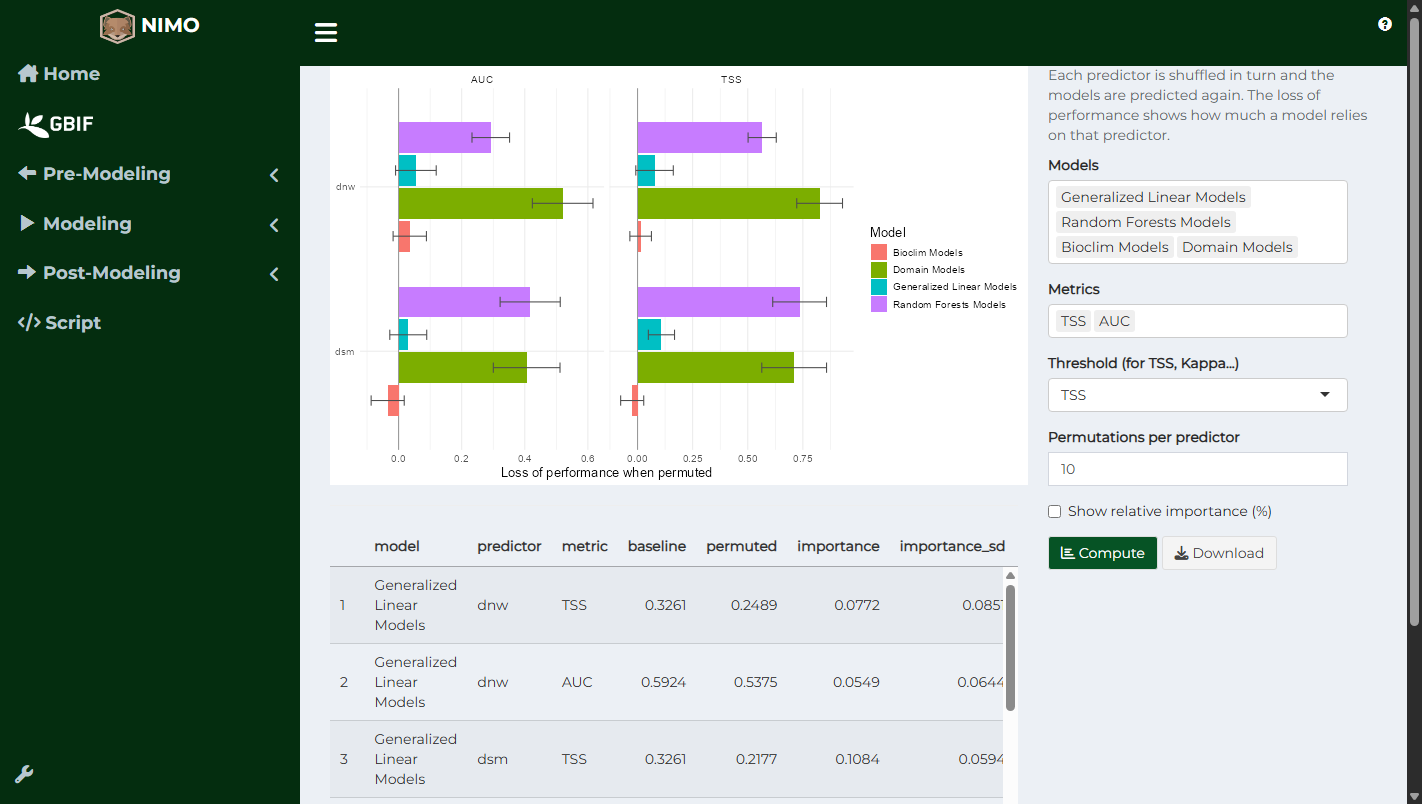
The plot shows one panel per metric, with the predictors ordered by importance. Error bars show the variability between permutations. A predictor whose bar is close to 0 contributes little to that model; a negative value means shuffling it did not reduce performance at all. Show relative importance (%) expresses each predictor as a share of the total importance of its model. The table gives the full results and can be downloaded.
Importance is computed on the modeling records, so it reflects what each model has learned. Compare models: a predictor important for all algorithms is likely to be a real driver of the distribution.
2. How does suitability respond? Response curves
A response curve shows how predicted suitability changes along one predictor. It is the best way to check that a model makes ecological sense: a species may prefer intermediate temperatures, avoid steep slopes, or depend on proximity to water.
In Post-Modeling > Response curves, select the Models and, optionally, the Predictors (all are shown when empty), then choose the Type:
- Marginal: the other predictors are held at their mean value. Simple and fast, but the combination of values used may never occur in reality.
- Partial dependence: for each value of the predictor, every record takes that value and the predictions are averaged (Friedman 2001). This accounts for the real combinations of the other predictors and for interactions between them, which matters for random forest, boosted trees, Bioclim and Domain.
Resolution sets the number of points along each predictor. Click Compute.
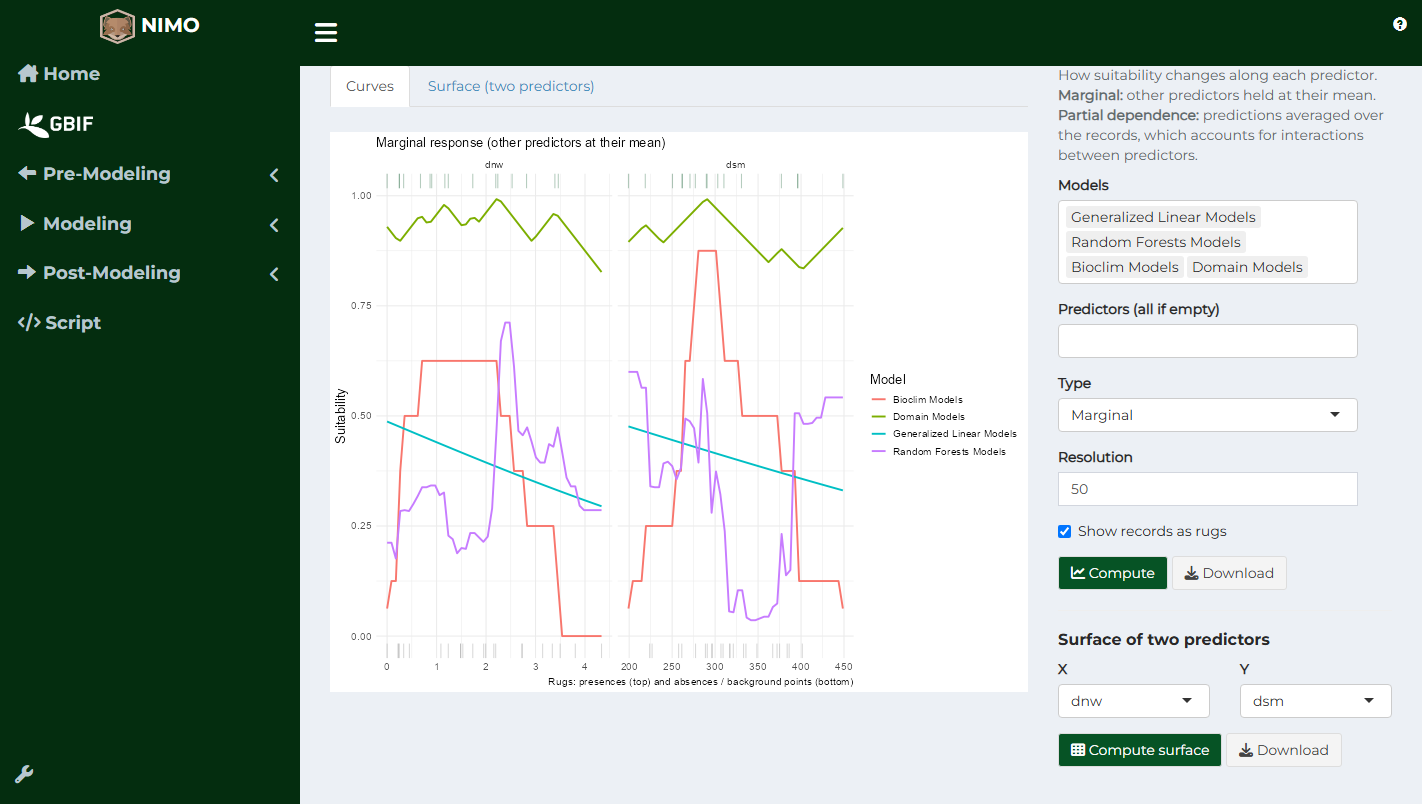
The rug marks show where the records are: presences on top, absences or background points at the bottom. Parts of a curve beyond the records are extrapolations and should be interpreted with caution.
In this example, Bioclim shows the flat plateau typical of an envelope, GLM a smooth trend, and random forest a stepped response.
Response surfaces
Interactions between two predictors are easier to see on a surface. In the Surface of two predictors box, choose X and Y and click Compute surface. Each panel shows suitability for one model over all combinations of the two predictors; the dashed line encloses the combinations observed in the records.
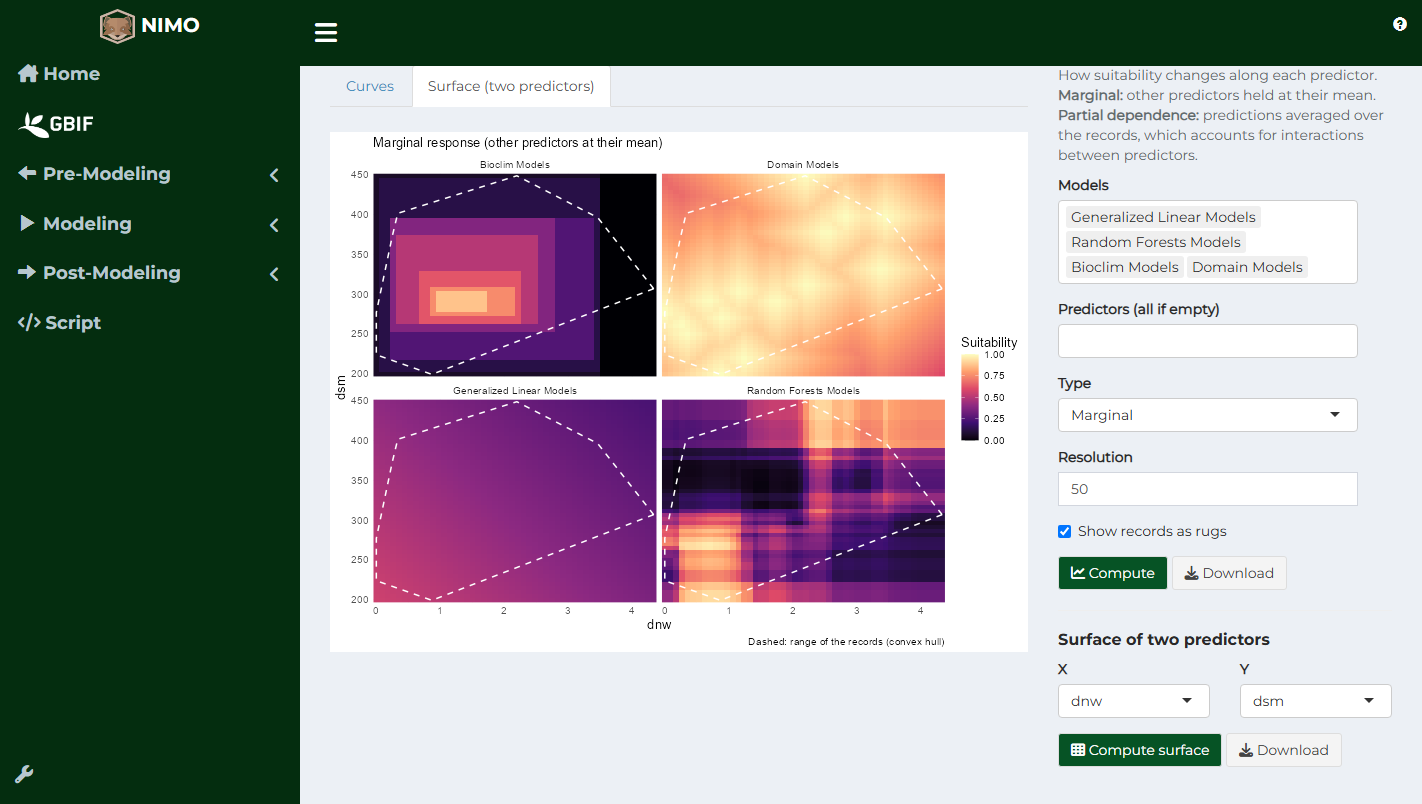
Models that do not use both predictors are skipped.
3. Mapping suitability: predictions
In Post-Modeling > Predictions:
- Select the models in the table (several standard models can be predicted together), or choose Ensemble in Model category to predict an ensemble. For Ensembles of Small Models, select one ESM.
- Choose one or more Threshold values to also obtain binary maps.
- Optionally, click Add area to restrict the prediction to a polygon (shapefile or KML).
- Clamp and Type of response apply to Maxent: clamping limits predictors to the range seen during training; cloglog is the usual output scale.
- Click Predict.
The window lists the maps produced: one continuous suitability map per model and one binary map per threshold. Select a map in Prediction to display it and Download to save it as a GeoTIFF.

Bioclim diagnostic maps
For Bioclim models, two additional maps help explain the prediction:
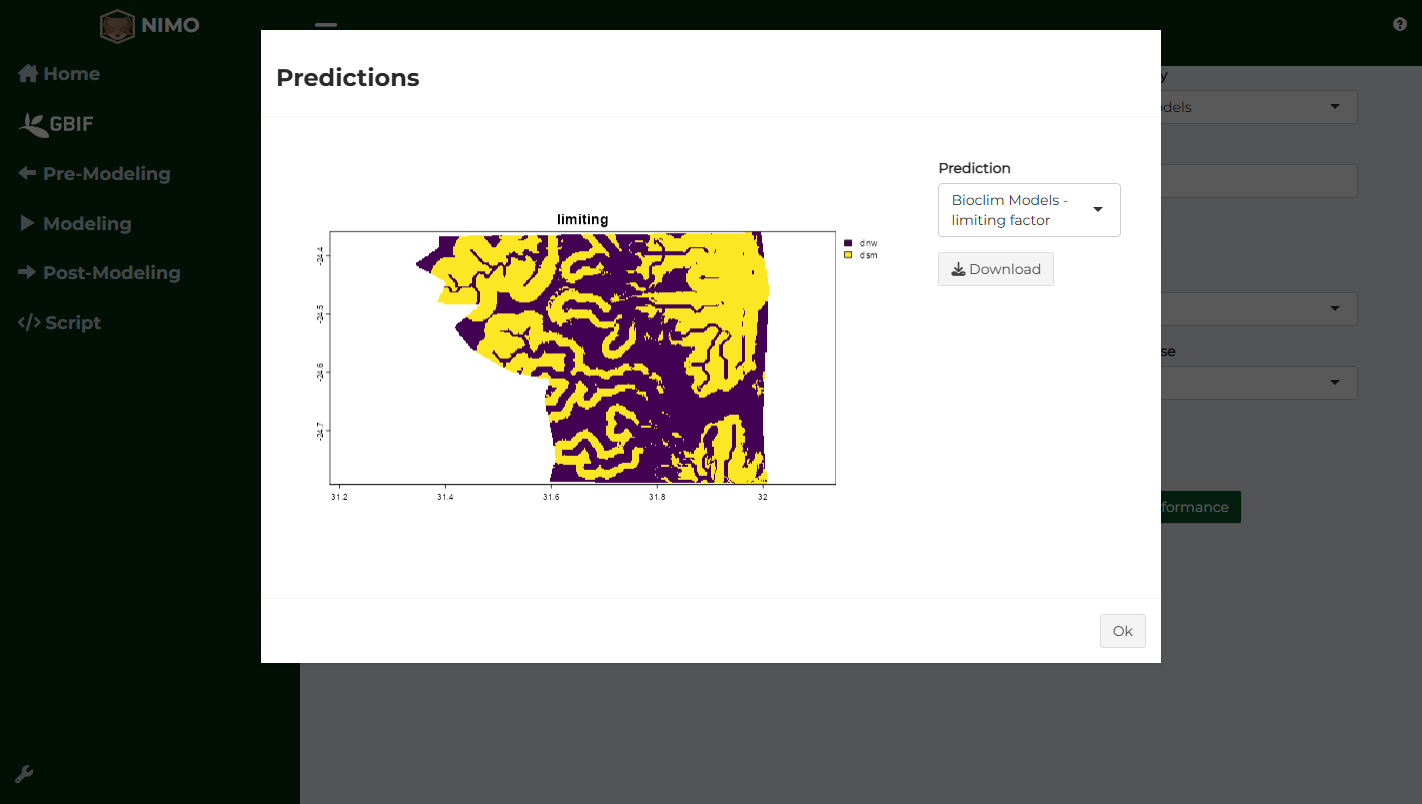
- Limiting factor: in each cell, the predictor that limits suitability the most;
- Envelope class: core (all predictors within the 5th to 95th percentiles of the presences), marginal (all within the observed range, at least one outside the core), or outside (at least one predictor outside the observed range).
Comparing models
Merge performance gathers the performance tables of the selected models (standard models, ensembles or ESM) into one table, which Export saves to a file. Use it to compare the algorithms on the same metrics.
4. Where can predictions be trusted? Extrapolation
A model learns the relationship between the species and the conditions present in its training records. Where the study area has conditions outside that range (higher temperatures, a new combination of rainfall and elevation), the prediction is an extrapolation, and its reliability decreases (Elith et al. 2010; Guillaumot et al. 2020). This is common when a model is applied to another region or a future climate.
In Post-Modeling > Extrapolation & uncertainty, choose the Metric (Mahalanobis by default, which accounts for correlations between predictors, or Euclidean) and the Aggregation factor (values above 1 coarsen the raster to speed up computation), then click Extrapolate. The map shows the degree of extrapolation of each cell compared to the training records: higher values mean more dissimilar conditions (Velazco et al. 2024). Save downloads the map.

Extrapolation in environmental space
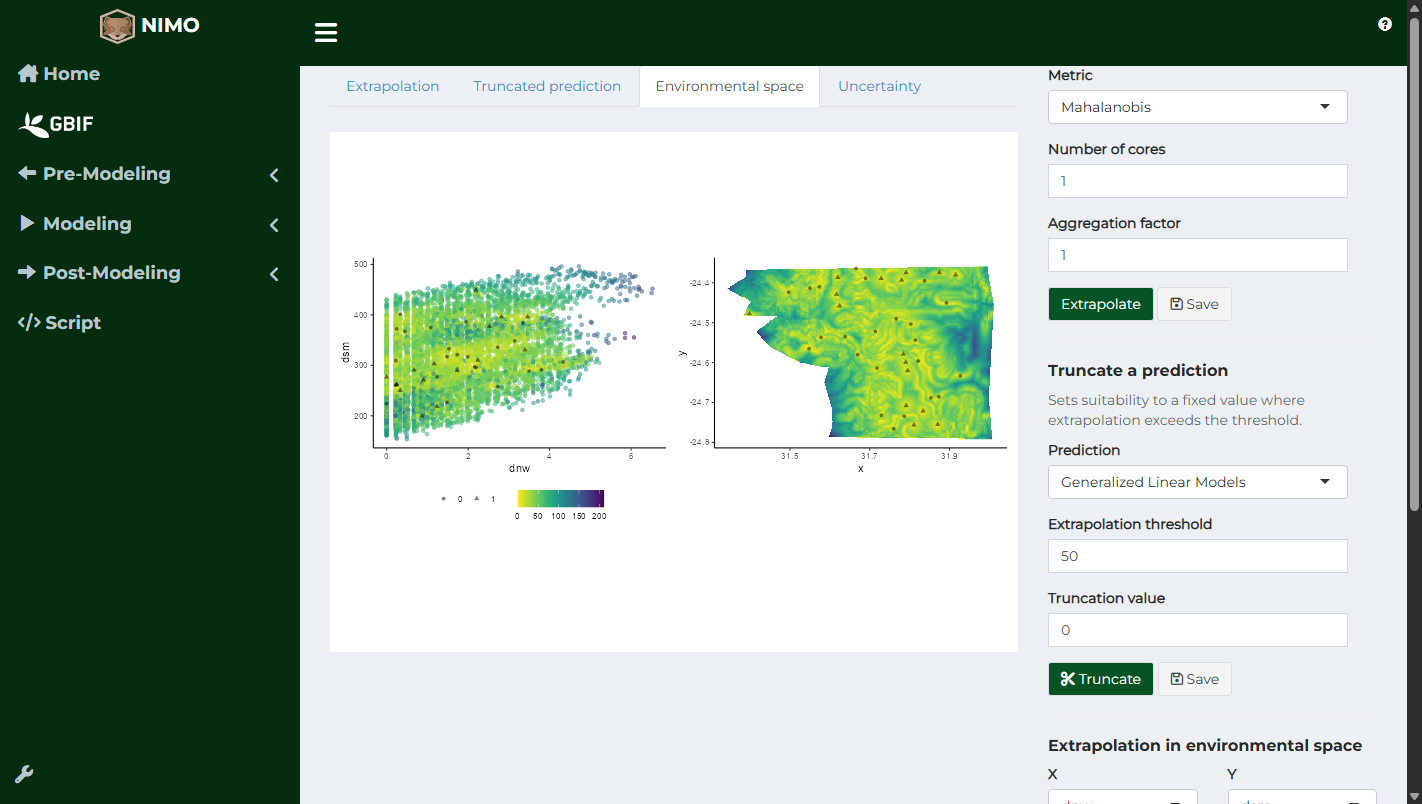
The same information can be viewed in the space of two predictors. Choose X and Y under Extrapolation in environmental space and click Plot. Each point is a cell of the study area coloured by its extrapolation, with the presences and absences on top. With Also show geographical space, the extrapolation map is drawn alongside.
Truncating predictions
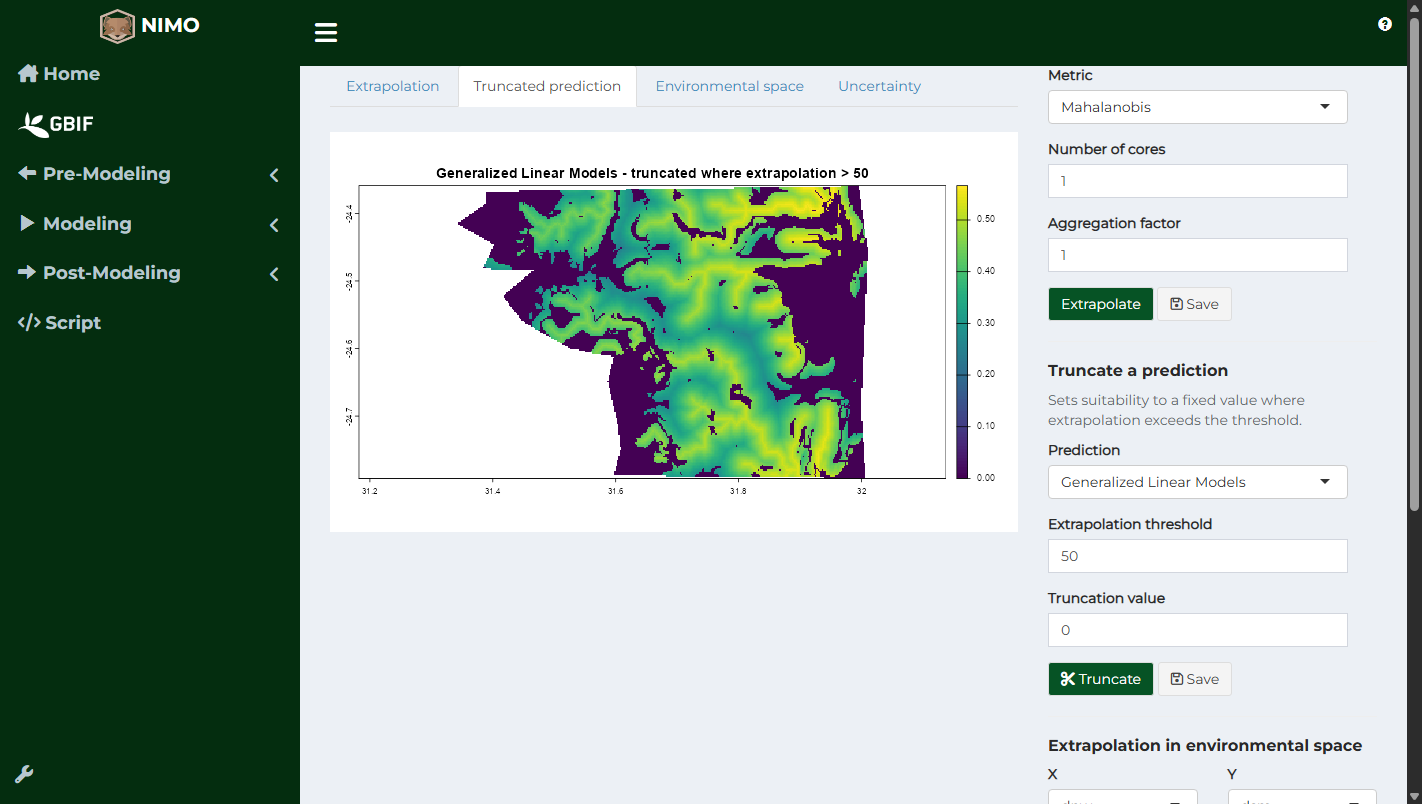
To avoid presenting extrapolated areas as suitable, predictions can be truncated: under Truncate a prediction, choose a Prediction, the Extrapolation threshold above which cells are truncated, and the Truncation value (0 by default), then click Truncate. Save downloads the truncated map.
5. How stable are predictions? Uncertainty
Predictions also depend on which records happened to be collected. To measure this, the model is refitted many times on bootstrap samples (80% of the records drawn at random) and predicted each time. The standard deviation of these predictions shows where the map is stable (low values) and where it changes with the records used (high values).
Under Uncertainty (bootstrap), choose the Model, the number of Iterations (20 by default; 50 to 100 for a final analysis) and Cores, then click Map uncertainty. Save downloads the map.
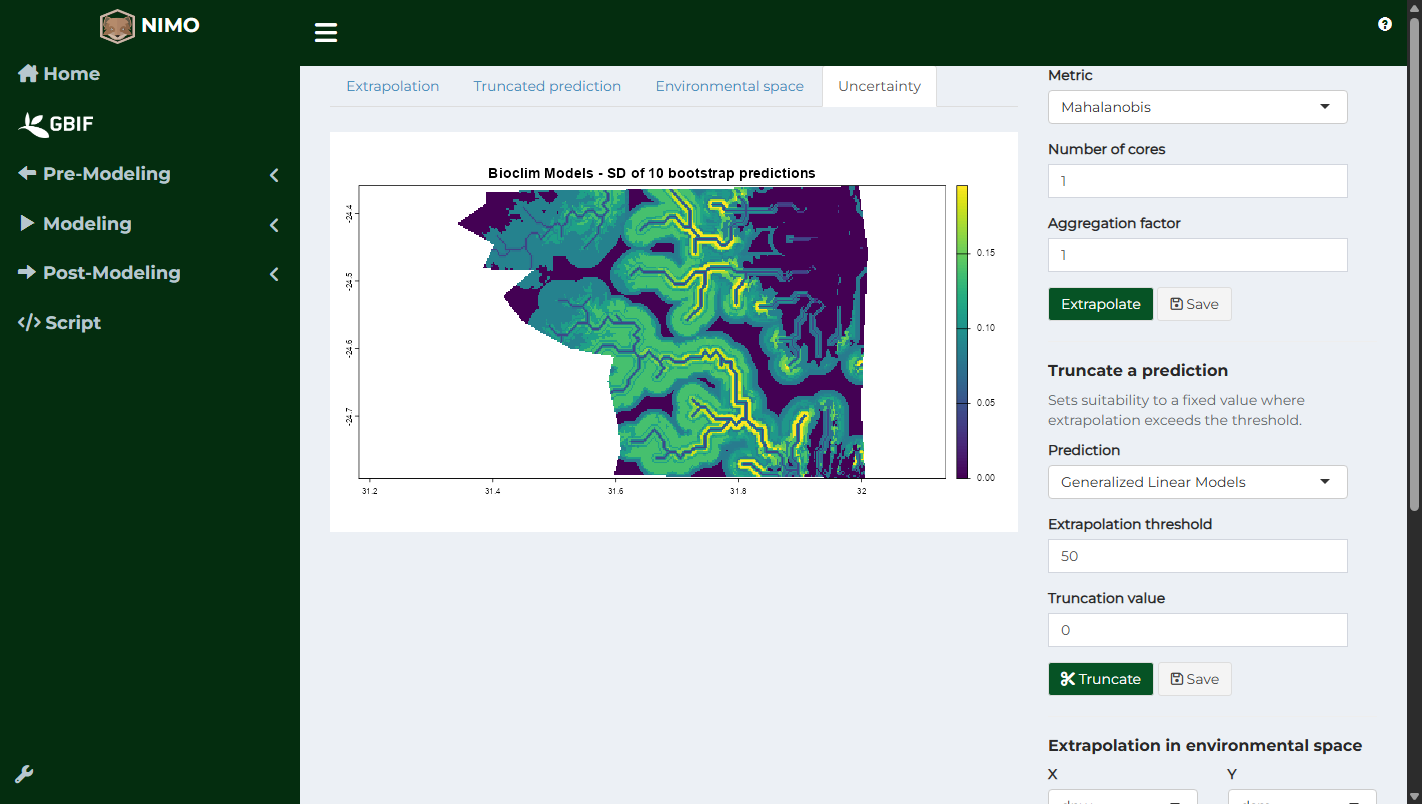
High uncertainty often appears where records are few, at the edges of the environmental range, or for very flexible algorithms. Reporting uncertainty along with suitability helps readers judge the map.
6. Correcting overprediction
Models may predict suitable areas far from any record, where the species is absent because it could not reach them or because of factors missing from the predictors. Overprediction correction restricts suitability using the location of the records, after the models are fitted (Mendes et al. 2020). The Pre-modeling page describes the alternative of adding spatial constraint layers before fitting.
In Post-Modeling > Overprediction correction, choose the Suitability map (from the predictions made in step 3), the Longitude and Latitude columns of the records, the Threshold, and a Method:
| Method | Principle |
|---|---|
| Occurrences Based Restriction | Keeps suitable patches that contain presences or are close to them |
| Presence | Keeps only suitable patches that contain presences |
| Lower Quantile | Like Occurrences Based Restriction, with a stricter distance limit (lower quartile of the distances instead of the maximum) |
| Minimum Convex Polygon | Keeps suitability inside the minimum convex polygon of the presences |
| Buffered Minimum Convex Polygon | Same, enlarged by a buffer (Buffer, in metres) |
Click Correct, then Download to save the corrected map.

7. Reporting
A clear report lets others evaluate and repeat the analysis. The ODMAP protocol (Zurell et al. 2020) lists the information to report: aim, data, predictors, calibration area, algorithms and settings, evaluation, and predictions. The Script menu records every step and setting used in nimo (see Reproducible script), which makes this report much easier to write.
References
- Breiman, L. (2001). Random forests. Machine Learning, 45, 5-32.
- Elith, J., Kearney, M., & Phillips, S. (2010). The art of modelling range-shifting species. Methods in Ecology and Evolution, 1, 330-342.
- Friedman, J. H. (2001). Greedy function approximation: a gradient boosting machine. The Annals of Statistics, 29, 1189-1232.
- Guillaumot, C., Moreau, C., Danis, B., & Saucède, T. (2020). Extrapolation in species distribution modelling. Application to Southern Ocean marine species. Progress in Oceanography, 188, 102438.
- Mendes, P., Velazco, S. J. E., de Andrade, A. F. A., & De Marco, P. (2020). Dealing with overprediction in species distribution models: how adding distance constraints can improve model accuracy. Ecological Modelling, 431, 109180.
- Velazco, S. J. E., Rose, M. B., De Marco, P., Regan, H. M., & Franklin, J. (2024). How far can I extrapolate my species distribution model? Exploring Shape, a novel method. Ecography, 2024, e06992.
- Zurell, D., Franklin, J., König, C., et al. (2020). A standard protocol for reporting species distribution models. Ecography, 43, 1261-1277.